Make more
of your data.

Build reliable data products, explore ideas, and turn analysis into action. One connected workspace, right on your desktop.

FilesDatabasesAPIs
Connect. Shape. Understand.
A data product
you can build on.
Versioned. Documented. Traceable.
DashboardsAppsAgents
Bring the whole story together.

Your work, connected.

Explore the workspace
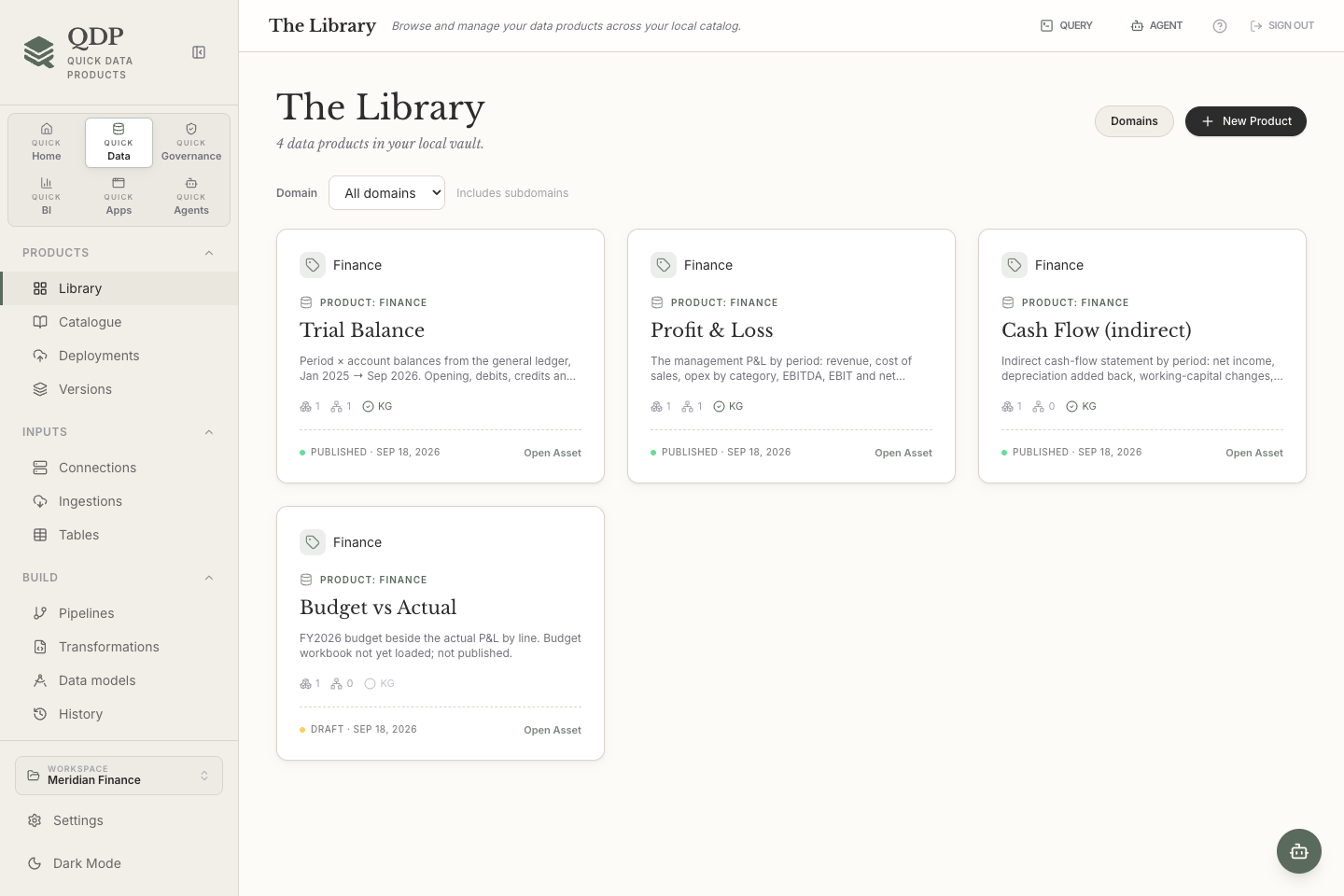
QDP Library showing the Trial Balance, Profit and Loss, and Cash-flow data products in the sample finance workspace.
Give good data a home.Keep ownership, outputs, quality and lineage with the product they describe. View data products full size (opens in a new tab)
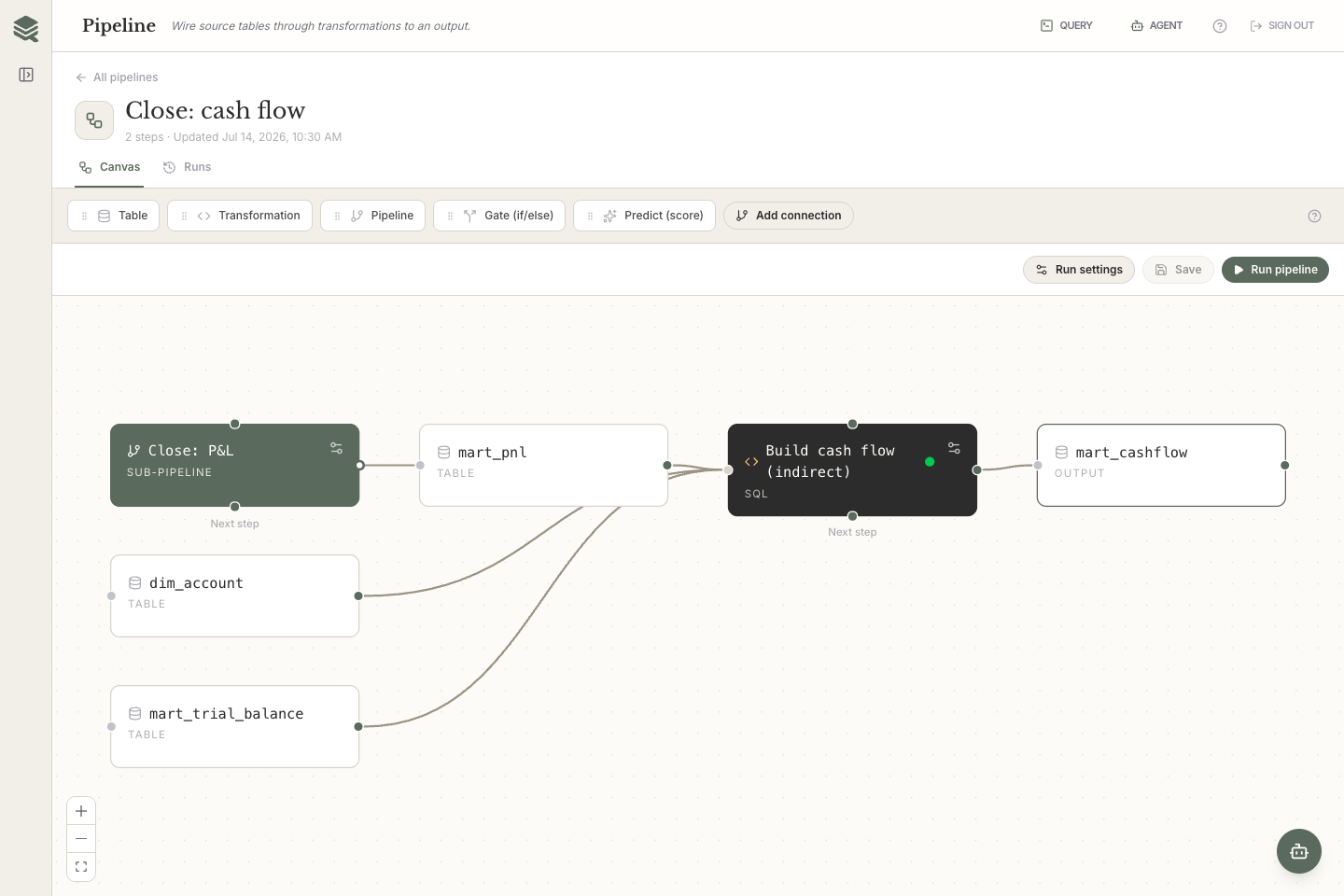
QDP pipeline canvas connecting source tables, transformations and financial outputs in a sample workspace.
See how the work flows.Connect transformations, branch on outcomes and trace each run from source to output. View pipelines full size (opens in a new tab)
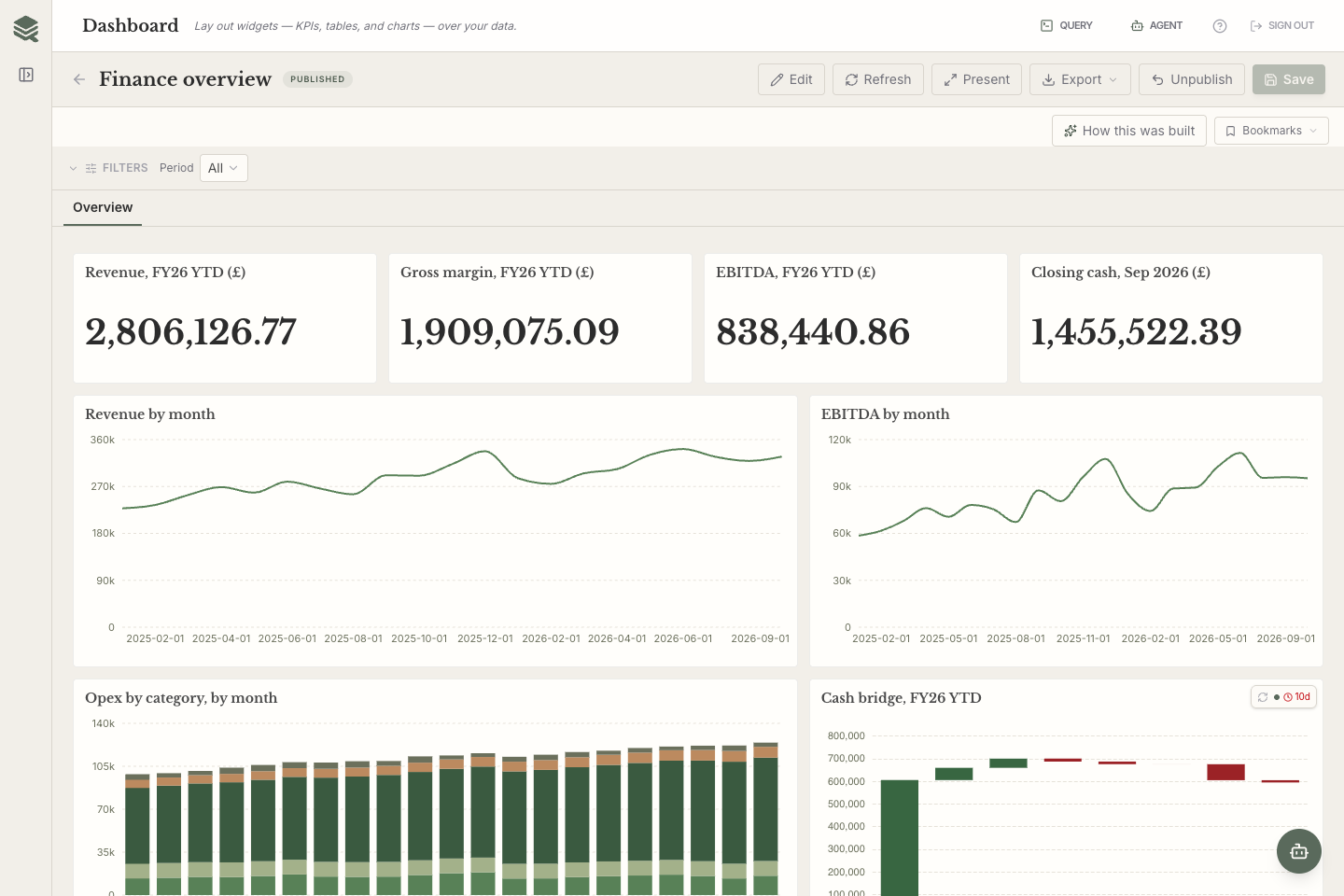
A QDP finance dashboard displaying charts and financial measures calculated from the sample workspace.
From a trusted model to a useful answer.Explore, filter and drill into dashboards built on your workspace data. View insights full size (opens in a new tab)
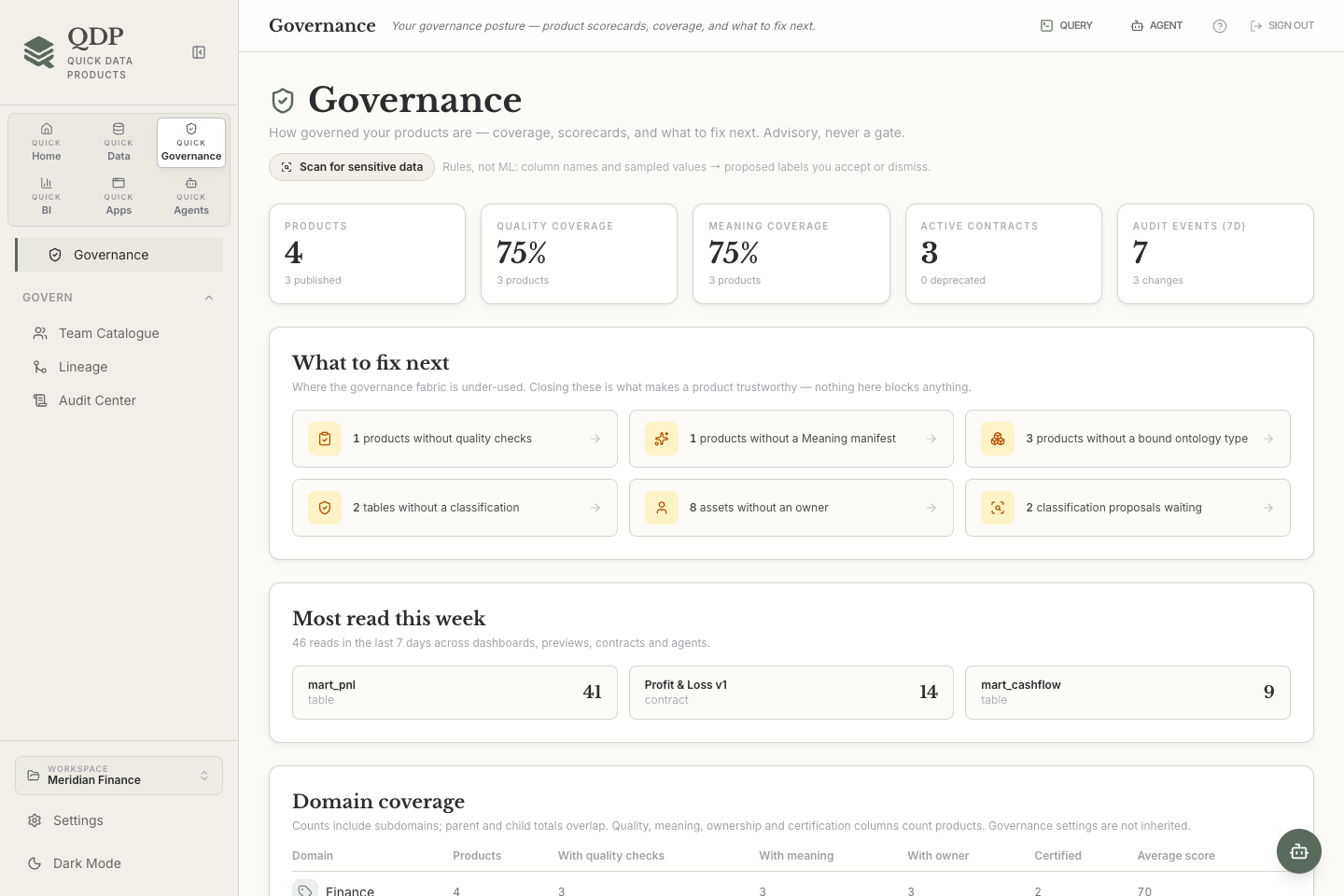
QDP Governance Explorer showing product ownership, quality and governance information for the sample workspace.
Understand what sits behind the number.Bring quality, ownership, classification and lineage into the same view. View governance full size (opens in a new tab)

Actual QDP interface. Illustrative data from the built-in sample workspace.

Less moving between tools.
More moving forward.

A query in one place. A spreadsheet in another. Definitions somewhere else. QDP brings the work and its context together.

Connected.

Keep the thread from source to decision.

Ingest, transform, model, publish and analyse in one workspace. Your lineage follows the data, so the next person can follow it too.

Local.

Start with your laptop.

Embedded DuckDB handles analytical work on your machine. Explore and build without first provisioning a cloud warehouse.

Reusable.

Make the next answer easier.

Turn a one-off result into a documented, versioned data product with quality checks and outputs others can depend on.

A clear path from
raw to ready.

Start with a file. Connect a database. Bring a question.
There’s room to grow from there.

  1. 01

    Bring it together

    Load files, connect databases or pull from APIs. Choose snapshots, live links or repeatable ingestions.

    Your sources. One workspace.
  2. 02

    Give it shape

    Work in SQL, Python or visual steps. Build pipelines and define shared measures and relationships.

    Use the way you think.
  3. 03

    Make it dependable

    Attach quality checks, document meaning and publish immutable Parquet contracts with their own version history.

    An output with a promise.
  4. 04

    Put it to work

    Build dashboards, explore in notebooks, create data apps or let a scoped agent help with the next task.

    From analysis to action.

Serious capability.
One familiar place.

Go deeper as the work demands it. The tools share the same workspace, so each step adds context to the next.

Build with QDP

Quick Data.
Quick Governance.
Quick BI. Quick Apps.
Quick Agents.

Connect & ingestA reliable starting point for every source.

CSV and Excel files, relational databases, NoSQL sources and HTTP APIs. Bring data in once or make the load repeatable.

  • Embedded DuckDB; Postgres, MySQL/MariaDB, SQL Server/Azure SQL, Redshift, SQLite and DuckDB-file connections
  • MongoDB, Cassandra and Firestore snapshot imports
  • No-code API builder with authentication, pagination and response previews
  • Replace, append or upsert loads; schema-drift controls, cancellation and run logs
Transform & orchestrateWrite code, build visually, or do both.
  • SQL and Python transformations with notebook cells and Markdown notes
  • No-code filtering, joins, aggregation and calculated columns with step-by-step previews
  • Visual pipeline graphs, nested pipelines and if/else gates
  • Success, failure and completion dependencies; cancellation and recorded run outcomes
  • CLI scheduling and background operation while the app window is closed

Python is installed separately. Scheduled and background work needs the host machine and QDP runtime running.

Model & publishTurn working data into a reusable product.
  • Semantic models with entities, relationships, measures, metrics and drill hierarchies
  • Multiple output ports with independently versioned Parquet contracts
  • Schema comparisons, content hashes and quality-gated publishing
  • A consumer catalogue with schemas, previews, quality results and version history
  • DPROD JSON-LD, native table materialisations and generated dbt model files and semantic YAML
  • Meaning manifests, shared dimensions and an ontology of objects, links and governed actions

QDP writes dbt artefacts into your project; dbt and MetricFlow are external tools and are not run by QDP.

Govern & tracePut trust beside the work.
  • Governance Explorer with ownership, certification, tags and asset posture
  • Quality checks, freshness expectations and a history of results
  • Table and column lineage, audit history and workspace usage insights
  • Rule-based classification proposals for sensitive data, with human review
  • Identity-aware access policies, column masks and row filters for supported agent and sharing paths

The local workspace owner remains in control. Policies do not create a security boundary against that owner.

Explore & visualiseFollow the question, then share the answer.
  • SQL Query with autocomplete and read-only exploratory notebooks
  • SQL, Python, Markdown and chart cells; captured results and report previews
  • Drag-and-drop dashboards, KPIs, tables, charts and geographic maps
  • Filters, cross-filtering and semantic-model drill-down
  • Versioned ONNX model registry, optional Python training in Labs, batch prediction and drift statistics

Python notebooks and model training need your separately installed Python and the relevant packages.

Build data appsLet people act on what they learn.
  • Visual app builder with tables, forms and data-bound components
  • Governed writeback with a recorded write-intent history
  • Published apps in a consumer-facing application catalogue
  • A focused run view for the people using your app

These are QDP workspace apps. Publishing an app does not create a publicly hosted website.

Work with agentsYour tools. Your model. A visible trail.
  • In-app assistant using Anthropic or an OpenAI-compatible endpoint, including local providers
  • A localhost MCP server for external agent tools and a built-in MCP Playground
  • Role-scoped Agent Portfolio with attribution, tool permissions and run history
  • Build plans to review before work proceeds; recorded reasons for external-agent mutations
  • Provider keys stored in the operating system keychain

Bring your own model and provider access. Agent requests and tool results may be sent to your chosen AI provider.

Collaborate & deliverKeep useful work moving beyond your desk.
  • QDP Cloud organisations, invitations and a shared Team Catalogue
  • Opt-in sharing of contract schemas, governance metadata and quality results
  • Shared workspace repositories and a CLI for headless workflows
  • Microsoft Fabric Lakehouse deployment of published products, with drift monitoring
  • Desktop interface in English, Spanish, French, German and Italian

Cloud sharing, shared repositories and deployment require their respective services and credentials. Team Catalogue sharing sends metadata, not table rows or Parquet files.

Your machine.
Your way of working.

QDP’s analytical warehouse lives on your desktop. Start small, keep the context close, and connect to external tools when your work needs them.

No cloud warehouse required for the core workflow.

Open Parquet and JSON-LD outputs, plus dbt artefacts.

Optional Python, external databases and your choice of AI.

How local-first works

A few things worth knowing.

Who is QDP for?

Analysts, analytics engineers and data teams who need to turn raw inputs into useful, reusable outputs. Start with a file and a query, then add pipelines, shared definitions, quality checks, dashboards and apps as the work grows.

Do I need to write code?

Not for every task. QDP has visual transformations, pipeline canvases, dashboard builders and data apps. SQL and Python remain available when you need more control. Python itself is installed separately.

What stays local, and what connects online?

Your local warehouse and analytical processing stay on your machine. QDP requires an account and an active licence, checks that licence online and sends anonymised usage counts and app/OS metadata. It supports a limited offline grace period, not permanently disconnected use.

External sources, cloud collaboration and deployments use the services you configure. If you enable AI, prompts and tool results may go to your chosen model provider. Metadata-only team sharing does not upload your table rows or Parquet files.

Does QDP replace my existing stack?

QDP gives you a connected place to develop and use data products, with open outputs that fit into a wider stack. Keep your databases and Python tools, generate dbt artefacts, or deploy published products to Microsoft Fabric. QDP does not bundle or run dbt or MetricFlow.

Which platforms does QDP support?

QDP is a desktop application, with releases for macOS Apple Silicon and Windows. Installer availability varies by release and architecture. The waitlist is for news about access and upcoming releases; joining does not create an account, grant a licence or promise an access date.

What happens when I join the waitlist?

We save your email so we can contact you about QDP access and release news. No payment details and no workspace data are collected by this form. Read how we handle your waitlist details.

Your next good idea
starts with good data.

Be the first to hear about QDP access
and what’s coming next.

Just the next step. No payment details required.